Every day, people go online looking for legal help. Some need answers quickly. Others are ready to book a consultation. Google Ads gives your law firm a way to appear at the exact moment someone searches for your services, our own effort to rank well in Google Ads for Personal Injury Lawyers.
In this guide, you’ll find our step-by-step process for helping law firms like yours build effective campaigns. We’ll walk you through choosing the right keywords, writing ads that resonate, and tracking leads that turn into real conversations.
You might already be running ads and not seeing results. Or maybe you’re just getting started and want to do it right from the beginning. Either way, this guide will show you how to avoid common mistakes and set up a campaign that brings in qualified inquiries. For example an Immigration Lawyer doesn't want generic or commercial legal enquiries wasting the time of key personnel.
Keep reading to learn what makes a Google Ads campaign work for law firms and how to create one with confidence.
What is Google Ads and How Does it Work for Lawyers?
Google Ads is a pay-per-click (PPC) advertising platform that helps law firms reach people who are already looking for legal services.
Your ads can appear on Google’s search engine results pages, YouTube, and other websites within Google’s display network. This means you can show up in front of potential clients at the exact moment they’re searching for help.
You only pay when someone clicks on your ad. That makes it one of the most cost-efficient ways to connect with people who have real intent to hire.
There are several types of Google Ads campaigns to choose from:
- Search ads show up when someone types a legal query into Google
- Display ads appear on websites your audience may visit
- Local Services Ads appear at the top of search results and charge per lead, not per click
The best option depends on your goals, your practice area, and how your potential clients tend to search.
Why Is This Important For Law Firms?
More than 90 percent of online experiences begin with a search engine.
When your law firm isn’t showing up in those results, potential clients go elsewhere. According to BrightEdge, search engines are still the top source of website traffic for most industries, including legal.
Want To Reach Local Clients?
Targeted, local campaigns often outperform broad ones. Focusing your ads on a specific city, region, or radius around your office can drive higher-quality leads and better return on ad spend.
One great example is this local Google Ads in Minnesota, which highlights how well-planned local targeting helps law firms reach clients nearby who are actively searching for help.
Why Strategy Matters
A well-structured Google Ads account allows you to launch, track, and improve multiple campaigns at once. With the right keywords, budget controls, and landing pages in place, your PPC campaign can become a steady and predictable source of high-quality leads. In many cases, it also delivers results faster than relying on SEO alone.
Why Keyword Research Can Make or Break Your Campaign
One of the most common reasons a Google Ads campaign fails is poor keyword selection. If you’re a lawyer who’s never heard of keyword research, think of it as figuring out what your potential clients type into Google when they need legal help.

For example, someone looking for help after a crash might search “car accident lawyer free consultation.” That exact phrase is a keyword. The more specific it is, the more likely the person behind it is ready to call.
Keyword research helps you identify those specific terms so your ads only show to people who are most likely to become clients. You’ll avoid wasting money on vague searches like “law” or “attorney,” which attract clicks from people who might just be browsing or researching.
Here’s how to start:
- Use tools like Google Keyword Planner to see what people in your area are searching.
- Choose targeted keywords related to your exact legal service and location.
- Avoid expensive, general phrases and focus on long tail keywords that show intent.
- Add negative keywords to block irrelevant clicks (like “free advice” or “legal studies”).
Pro Tip: Let’s say you run a family law practice in Austin. Instead of bidding on “family lawyer,” try “family lawyer Austin custody case” or “divorce attorney free consult Austin.” These longer phrases may get fewer clicks, but they attract people who are much more likely to convert.
The goal isn’t to chase every possible click. It’s to show up when someone is ready to take action. Keyword research is what helps make that possible.
Setting Up a Google Ads Campaign That Converts
OK, now that you know why you need Google Ads, let’s move on to how to set up your campaign.
Most law firms lose money before they ever get their first click.
That usually happens because the campaign was set up too fast or left to Google’s default settings, which aren’t tailored for legal services. A well-planned setup does more than just get your ads running. It creates the structure you need to attract leads that actually turn into clients.
Let’s break this into steps so you can build a campaign that actually works for your practice.
Choose the Right Campaign Type
There are different campaign types within your Google Ads account. Here’s a quick breakdown:
- Search Campaigns: These show your text ads on Google’s search results when someone types a relevant query, like “personal injury lawyer near me.” This is usually the most effective type for law firms.
- Display Campaigns: These use image-based ads across websites and apps. They’re better for brand awareness but not ideal for quick lead generation.
- Video Ads: These run on YouTube and work well for educational content or FAQs, especially for attorneys building a reputation.
- Local Services Ads: These are only available in some areas, but they appear at the very top of search results and are pay-per-lead instead of pay-per-click.
Tip: For most law firms, start with search campaigns to capture high-intent leads, then explore other types once you’ve mastered the basics.
Use Practice-Specific Ad Groups
Once you pick your campaign type, organize it into ad groups. Each group should focus on a single area of your practice.
For example:
- “Car Accident Lawyer”
- “Slip and Fall Attorney”
- “Workers’ Compensation Claims”
By keeping your ads tightly grouped around specific topics, your ad copy will match the user’s search more closely, improving ad relevance and click-through rate.
Align Your Campaign With Your Goals
Think about what you want to achieve: calls, form submissions, or booked appointments? Use conversion goals that match those outcomes. This gives Google better data and ensures your campaign is optimised for real results, not just clicks.
When you take time to set up your campaign properly, everything else becomes easier.
You’ll spend less on wasted clicks, attract more qualified leads, and gain better insights into what’s working.
Think of this setup as the groundwork for your entire PPC campaign. Get it right, and you’ll be in a much stronger position to optimise and grow over time.
What Is an Ad Group, and Why Does It Matter?
An ad group in Google Ads is a structural element that links a group of specific keywords with the ads and landing page designed to support them. Think of it as the central hub for a single topic within your campaign.
Ad groups help you organize your campaigns by topic, but they also improve how relevant your ads feel to the person searching. When your ad matches what someone typed into Google, it’s more likely to get clicked and lead to a real inquiry.
Here’s what improves when your ad is well matched to the search:
- Quality Score: Google gives better placements to ads that match user intent.
- Ad relevance and click-through rate: People are more likely to click when the ad feels tailored to their need.
- Cost per click: Google rewards high-performing ads with lower costs.
For example, if you're a personal injury lawyer, keep “car accident,” “slip and fall,” and “workplace injury” as separate ad groups. That way, each group can have its own ad copy and landing page that directly speaks to the issue.
Some advertisers go as far as using SKAGs (Single Keyword Ad Groups), but that’s not always necessary. Grouping by service area or case type is often enough to keep your message focused.
Why it matters: It gives you more control, allows you to test what’s working, and helps make every click count.
How to Write Ads That Actually Perform
A well-structured ad group needs a well-written ad to go with it. Even with the right keywords and landing page, a vague or generic ad won’t get results.
Good legal ads speak directly to the searcher. Here’s a simple formula that works:
- Headline that mirrors the search
Example: “Injury Lawyer Brisbane – Free Case Review”
- A clear benefit
Example: “No win, no fee. 20 years of results.”
- A strong call to action
Example: “Call now for your free consultation.”
This formula works because it removes the guesswork. It responds to exactly what the person is looking for, builds credibility quickly, and tells them what to do next.
Use Ad Extensions to Stand Out
Ad extensions give you more room to share helpful information without adding to your cost. They make your ad more noticeable and informative.
Consider adding:
- Sitelinks that guide users to specific practice areas
- Location details and your phone number
- Callouts like “Available 24/7” or “Trusted by 1,000 clients”
- Review snippets or recognition from trusted sources
These additions make your ad feel more complete and help build trust before someone even clicks. According to Search Engine Land, using ad extensions can lift click-through rates by up to 15%. That can translate to more qualified leads without raising your ad spend.
Optimizing for ROI (Without Burning Your Budget)
Spending more isn’t the problem. It’s spending without a plan that hurts the most.
Google Ads can be expensive for lawyers. Some clicks cost $50, $75, or even more. That doesn’t mean the platform is broken. It just means you need to be intentional with how you use it.
Let’s talk about how you can protect your budget, improve your results, and make sure every dollar you spend is working hard for your firm.
Pick a Bidding Strategy That Matches Your Goals
Google gives you a few different ways to manage your bidding. The one you choose should line up with your objective.
Here are the most common options:
- Manual CPC: You choose how much to spend per click. Great if you want control and want to test slowly.
- Maximize Conversions: Google adjusts your bids automatically to get the most leads for your budget.
- Target CPA (Cost Per Acquisition): You set how much a lead is worth to you, and Google tries to hit that number.
When you're just starting out, it's smart to use manual or "Maximize Clicks" while you're learning what works. Then you can shift to more automated options later.
Tip: Always set a daily budget limit and a maximum bid when you launch a new campaign. This keeps your account from overspending before you know what’s performing.
Split Your Budget by Service Type
Not all legal services convert at the same rate or cost. You might get quick calls from accident-related ads but slower traction from estate planning.
Here’s what we recommend:
- Give each practice area its own ad group and its own portion of your budget.
- Track performance by service so you can spot what’s driving calls and what needs a change.
- Don’t be afraid to reallocate money toward campaigns that are delivering actual results.
Use Negative Keywords to Avoid Wasted Spend
Negative keywords help filter out traffic that won’t ever turn into a client. They tell Google not to show your ads for specific searches.
Examples to block:
- “free legal advice”
- “lawyer salary”
- “DIY will template”
By adding these to your negative keywords list, you stop paying for clicks that aren’t going to help your firm grow.
Tool Tip: Use the Search Terms report in your Google Ads account. It shows you exactly what people searched before clicking on your ad. This is where you’ll find great candidates for your negative list.
Keep an Eye on Cost vs. Conversions
You don’t have to obsess over your numbers every day, but check in weekly.
Look for:
- Cost per lead
- Click-through rate (CTR)
- Which campaigns are generating actual client inquiries
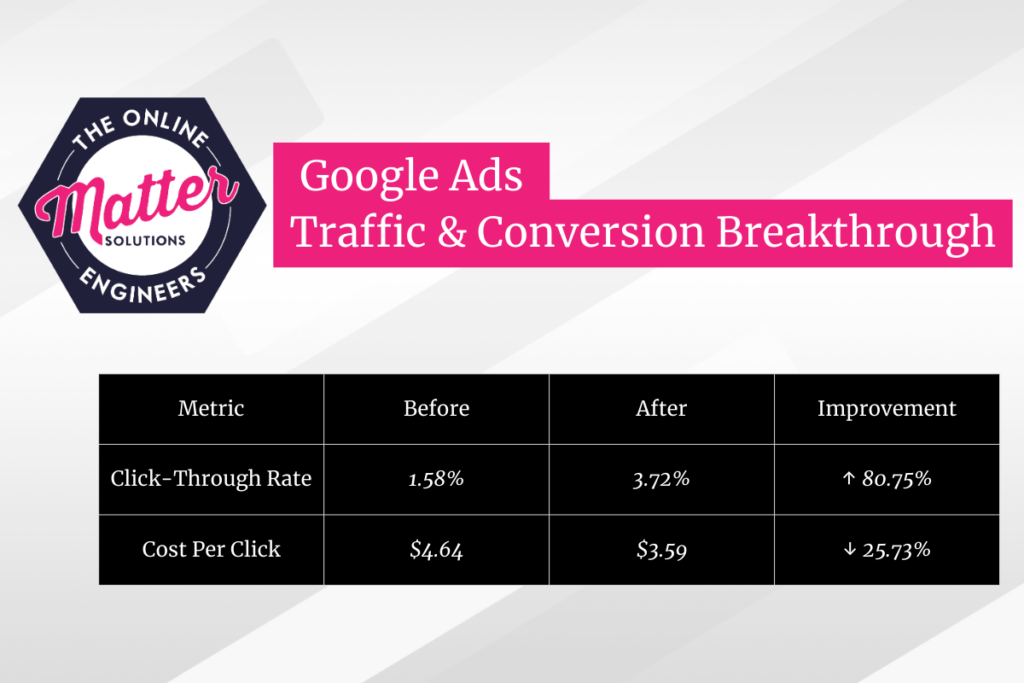
If something’s working, put more into it. If something’s not, adjust or pause it. The best Google Ads campaigns evolve as they go. Here is a successful Google Ads traffic & conversion Breakthrough example.
The Power of Ad Extensions
Ad extensions are add-ons you can apply to your Google Ads to show more information directly in the ad. They help potential clients see key details before they even visit your site. These can include your phone number, office location, service areas, or direct links to specific pages on your website.
Some of the most effective extensions for law firms include:
- Sitelinks, which let users go straight to “Free Consultations,” “Practice Areas,” or “Meet the Team” pages
- Call Extensions, which make it easy for mobile users to call you with one tap
- Location Extensions, which show your office address and a clickable map
- Callouts and Structured Snippets, which highlight specific services or benefits like “Available 24/7” or “Criminal Defense, Family Law, Personal Injury”
Used correctly, these extensions can make your ad stand out, improve click-through rates, and get more qualified leads to your firm without increasing your spend.
Real-World Example: 35% More Leads in 30 Days
A mid-sized personal injury law firm in Ohio ran identical search campaigns over two months. The only difference was that, in the second month, they added sitelinks, call extensions, and callout extensions to their existing ads.
Here’s what happened:
- Click-through rate increased by 21 percent
- Phone calls from ads went up 35 percent
- Cost per lead dropped by 14 percent
What made the difference? The extensions gave users more ways to interact. Some clicked straight to the contact page. Others tapped the call button without ever visiting the site.
The firm kept the same budget. They simply made their ads more helpful. That single change led to real, measurable improvement.
Why It Matters
Google often gives better placements to ads with extensions. They increase ad visibility, make your offer clearer, and improve the user experience. That results in higher performance without higher spend.
Quick Tip: Use at least four types of extensions. Google will automatically show the ones that best match the search and device. The more options you add, the more likely your ad is to stand out and get results.
Track What Matters: Measuring Campaign Success
Getting clicks is good. Knowing which ones lead to real clients is better.
Google Ads gives you tools to track results. But if you don’t set things up correctly, you won’t know which part of your campaign is bringing in actual business.
Let’s break this down so you can see what’s worth watching, even without a technical background.
Understand What a “Conversion” Means for Your Firm
A conversion is any action that shows someone is interested in becoming a client. This is more than just visiting your website. It could include:
- Calling your office directly from the ad or your website
- Filling out a “Request a Consultation” form
- Scheduling a meeting online
- Downloading a legal checklist or intake form
You define what counts as a conversion. This helps you measure what matters most to your firm.
Two Easy Ways to Set Up Conversion Tracking
You don’t have to be an expert to track conversions. Most law firms start with one of these two methods:
- Google Ads Conversion Tag
Google provides a small code you can place on your site. It tracks when someone completes an action like submitting a form.
- Google Tag Manager
This free tool helps manage all tracking codes in one place. It’s helpful for more complex websites or when you want full control.
Ask your developer or digital team to install this once. After that, Google does the rest.
Focus on Metrics That Actually Show Results
Once tracking is in place, keep your eye on these numbers:
- Conversions: This shows which ads are generating real leads
- Cost per conversion: Tells you how much you're paying for each inquiry
- Keyword performance: Helps identify which phrases bring in the best results
These are the numbers that help you spend smarter, not just more.
Make Weekly Checks Part of Your Routine
Every week, take 15 minutes to review your dashboard. Look for:
- Ads or keywords that are converting consistently
- Areas where you’re spending money but not seeing results
- Campaigns that deserve more of your budget based on recent performance
Quick Tip: Use the Google Ads “Overview” tab for a quick look. Or set up a Looker Studio report to track trends over time.
Consistent tracking gives you the confidence to know what’s working. That makes it easier to grow without second-guessing your ad budget.
Ongoing Optimization: What to Monitor Weekly
From what we’ve seen, the firms that get the best results are the ones checking their campaigns every week, and sometimes even every day.
Most law firms see mixed results with Google Ads because they launch a campaign, get a few leads, and then stop paying attention. But like your legal cases, your campaigns need regular reviews. Checking your data weekly helps prevent wasted spend and keeps performance on track.
This process doesn’t require you to be a Google Ads expert. You just need to know what to look at and what it means.
Why Weekly Checks Matter for Your Ad Campaign
Legal services are high-stakes purchases. People don’t just click on the first result and call. They search, compare, and evaluate. Weekly checks help make sure your ads are still showing to the right people and driving the actions you want.
Without weekly reviews, you could be paying for clicks that no longer reflect your goals. Your competitors might update their ads, adjust their bids, or target your keywords more aggressively. If you don’t monitor your performance, you miss these shifts.
Spending just 10 to 15 minutes once a week can help you avoid surprises, catch costly trends early, and keep getting strong leads.
Key Metrics That Help You Understand Performance
Here are the four most important numbers to check each week and what they really mean:
- Click-through rate (CTR)
This tells you how often people click your ad after seeing it. A low CTR usually means your headline or description isn’t relevant or compelling enough. If this dips, try updating your call-to-action or rewriting the headline to better reflect what people are searching for.
- Conversion rate
This shows the percentage of people who take action after clicking, like calling or filling out a form. If this number drops, your landing page might be the issue. Look at load speed, clarity, or whether the page matches your ad's message.
- Cost per conversion
This tells you how much you're spending to get each lead. A high cost per conversion may mean you’re bidding too much for broad keywords that aren’t delivering clients. You may need to refine your targeting or improve ad quality.
- Search terms
This report shows the exact phrases users searched before clicking. It’s a goldmine for insights. Use it to find new valuable keywords or to spot irrelevant ones you should block with negative keywords.
What Changes You Should Make Based on the Data
Once you review the metrics, take small, simple actions:
- Pause any ad group or keyword that’s spending a lot without bringing in leads
- Write fresh ad copy if CTR is low or if the ad doesn’t feel aligned with searcher intent
- Use more specific keywords in place of broad ones that are costing too much
- Increase budget for campaigns that are producing affordable, high-quality leads
These changes keep your ads focused on results instead of just running in the background.
Save Time by Using Automated Rules in Google Ads
Google Ads allows you to set basic rules that run automatically. For example, you can tell the system to pause any keyword that spends more than $100 without a conversion. You can also set alerts to notify you when costs go up or conversions stop.
Helpful Tip: Start with one rule such as pausing underperforming keywords. This adds a layer of safety without needing constant manual checks.
Make Optimization a Weekly Habit in Your Law Practice
Add this to your Monday or Friday routine. Even a 10-minute check helps you stay in control. Keep a simple spreadsheet or use the built-in Google Ads dashboard to track what you’re changing.
Ongoing optimization turns your ads into a steady stream of real leads. Small tweaks every week help you avoid waste and keep growing your campaign with confidence.
Advanced Tactics for Local Law Firms
When someone searches for a lawyer nearby, your ad should be right there at the top.
Most people who search for legal help are looking for someone local. They want to know who’s nearby, who understands the local courts, and who they can call today. That makes location targeting one of the most powerful tools in your Google Ads strategy.
This section explains how to use local features to reach the right people at the right time.
Use Location Targeting to Focus on Your Service Area
Google Ads allows you to control where your ads appear. You can choose to target by:
- City or town
- ZIP code
- Radius around your office
- Custom areas you define
This helps you show your ads only to people who are actually in your service area.
Why this works:
You don’t waste money on people who are too far away to become clients. Someone searching for a lawyer in your city is more likely to click, call, and book.
Tip: In your campaign settings, choose “People in or regularly in your targeted locations.” This ensures your ads are reaching actual locals, not people just passing through.
Use Local Language in Your Ads and Pages
When your ad matches the language someone uses in their search, it feels more relevant. That makes it more likely to get clicked.
Try this:
- Mention your city or region in the ad headline
- Include neighborhood names or local terms in the ad description
- Highlight how long you’ve served your area
- Add local keywords to your landing page text
Example: Instead of saying “Experienced Criminal Defense Lawyer,” say “Criminal Defense Lawyer in Houston with 20 Years Experience.” That small change makes a big difference in local trust and ad performance.
Consider Running Google’s Local Services Ads
Local Services Ads (LSAs) appear at the very top of search results. These show your business name, star rating, reviews, and a “call” button. They are designed for service providers like law firms.
The best part? You only pay when someone contacts you. You are not paying for clicks that may not lead to a real conversation.
Real Example:
A criminal defense firm in Houston tested LSAs alongside their usual Google Ads campaign. Within the first month, they saw a 40 percent increase in phone calls from local clients. Their overall cost per lead dropped because LSAs only charged for direct contact, not for every view or click.
Match Your Ad to a Local Landing Page
If someone clicks on your local ad and ends up on a generic homepage, they may leave. That’s a missed opportunity.
Create a dedicated landing page for each location you serve. Include:
- Office address
- Service area coverage
- Testimonials from local clients
- Driving directions or map
- Quick contact form
This builds trust, improves your ad quality score, and makes it easier for potential clients to reach out.
Why Your Landing Page Might Be Failing You
A good ad gets the click. A good landing page gets the client.
Even the best Google Ads campaign can fall flat if it sends people to a landing page that doesn’t deliver. A weak or confusing page is one of the top reasons law firms lose leads.
In this section, you’ll learn what a strong landing page should include so that visitors feel confident reaching out.
What Is a Landing Page and Why It Matters
A landing page is the first page someone sees after clicking your ad. It’s not always your homepage. In fact, it shouldn’t be unless your homepage is built to convert leads.
This page should focus on one thing only: helping the visitor take the next step.
That step might be calling your office, filling out a contact form, or booking a free consultation. Every word, image, and button should point toward that action.
Signs Your Landing Page Isn’t Doing Its Job
Here are some common signs your landing page may be turning people away:
- The page takes too long to load
- It looks cluttered or outdated
- The contact form is buried or confusing
- The headline doesn’t match the ad they clicked
- There’s too much information and no clear next step
When people feel unsure, they leave. That’s why having a clear and focused landing page is so important.
What a High-Converting Legal Landing Page Should Include
To turn visitors into leads, your landing page should have:
- A strong, relevant headline that matches the ad copy
- Clear contact options such as a form, phone number, or live chat
- Testimonials or reviews from real clients
- Trust elements like legal badges, years in practice, or case types
- A mobile-friendly layout that loads quickly on phones
- One clear goal such as “Call now” or “Request a free consultation”
Tip: Keep it simple. Focus on one message, one audience, and one outcome. Avoid links that take people away from the page.
Real-World Benefit of Fixing a Weak Landing Page
A small family law firm in Arizona was running ads but getting few inquiries. After reviewing their landing page, they realized the form was buried below the fold and their headline was vague.
They added a headline that matched their ad copy, moved the form to the top of the page, and added three short client testimonials.
The result? Their conversion rate doubled in just two weeks. Same ads, same budget. They saw better results because the landing page finally did its job.
Common Mistakes (and How to Avoid Them)
We’ve made plenty of mistakes in our own Google Ads campaigns over the years. The good news is, you can skip the trial and error and learn from what we’ve already figured out.
Google Ads works, but only when it’s done with purpose and precision. Many law firms waste money on common errors that are easy to fix once you know what to look for.
This section covers the top mistakes lawyers make with Google Ads and how to avoid falling into the same traps.
Mistake 1: Using Broad or Generic Keywords
Targeting words like “lawyer” or “legal help” may bring in clicks, but most of those searchers are not ready to hire. You end up paying for traffic that doesn’t convert.
What to do instead:
Use specific keywords related to your practice and location. Think “personal injury attorney Phoenix” or “divorce lawyer for men Chicago.” Add negative keywords like “free advice” or “law school” to block unqualified traffic.
Mistake 2: Sending Everyone to Your Homepage
Your homepage is not always built to convert. It may have too many options, distractions, or no clear call to action.
What to do instead:
Create dedicated landing pages for each service or campaign. These pages should match the ad copy and focus on one outcome, such as calling or submitting a form.
Mistake 3: Not Tracking What Happens After the Click
Running ads without conversion tracking is like arguing a case without knowing the facts. You have no idea what’s working.
What to do instead:
Set up conversion tracking in your Google Ads account. Track phone calls, form submissions, and any action that could lead to a consultation or a signed client.
Mistake 4: Ignoring Mobile Users
More than half of all legal searches happen on phones. If your site isn’t mobile-friendly, people will leave before they even read your offer.
What to do instead:
Check that your landing pages load fast and look good on mobile. Add click-to-call buttons to make contact simple.
Mistake 5: “Set and Forget” Campaigns
Google Ads is not something you run once and never touch again. Without updates, your ads will underperform and cost more over time.
What to do instead:
Review your campaigns weekly. Look for high-performing keywords, trim waste, and test new ad copy. Even small changes can lead to better results over time.
Frequently Asked Questions About Google Ads for Lawyers
Still thinking about how Google Ads fits into your legal marketing? You’re not alone.
We hear these questions all the time from lawyers who want to grow their firms without wasting time or money. This FAQ breaks down the essentials in plain language so you can make smart, confident decisions.
Does Google Ads work for lawyers?
Yes, it does. Google Ads helps lawyers reach people who are actively searching for legal help. Unlike traditional ads that interrupt, Google Ads appears when someone types a specific legal need into the search bar.
For example, if someone searches “DUI lawyer near me,” and your ad shows up, that person is more likely to become a lead. Success depends on having the right keywords, clear messaging, and a helpful landing page.
How much should a law firm spend on Google Ads?
Budgets vary depending on the size of the firm and the practice area. Many smaller firms start with $1,000 to $2,000 per month. Firms in highly competitive areas like personal injury or criminal law may need to invest more. What matters most is how well your ad spend turns into actual leads. Monitor your cost per conversion to stay in control of your return on investment.
What is the best form of advertising for a lawyer?
It depends on your goals and the type of law you practice. For many lawyers, Google Ads is one of the most effective forms of advertising. It targets people who are already searching for legal help and allows you to control when and where your ads appear. A strong Google Ads campaign paired with good online reviews and a clear website can deliver results quickly.
What kind of advertising do lawyers most commonly use?
Lawyers often use a combination of advertising methods. This includes Google Ads, local SEO, legal directories like Avvo or Justia, and sometimes social media. Some still use traditional methods like radio or billboards. Among all of these, paid search through Google Ads is one of the most common because of its ability to deliver fast results and highly targeted traffic.
Next Steps: Start Running Ads That Actually Work
You don’t need to be a Google Ads expert to get real results. You just need the right approach.
With everything you’ve learned so far, you now have the framework to launch or improve a campaign that speaks directly to the people who need your legal help.
From smarter keyword research to writing strong ad copy and building pages that convert, each part plays a role in getting better leads without wasting your budget.
The next step is to take action. Look at your current campaign or start from scratch with these best practices in mind. Start small, test often, and build from what works.
Want professional help managing your campaign? We specialize in running ads for law firms that want more qualified leads and fewer wasted clicks. See how we manage Google Ads for lawyers and what we can do for your firm at Matter Solutions.